
GAPID supports tracing all OpenGL ES and Vulkan calls made by an Android application. This works whether the application is pure Java, native or hybrid.
Dependencies and prerequisites
- A device running Android Lollipop 5.0 (or more recent).
- Either a debuggable application, or a device running a ‘rooted’ user-debug build.
- Android SDK installed on the host machine.
- Android hardware device connected through USB.
- The device must have USB debugging enabled and the host machine must be authorized for debugging.
Taking a capture
Click the Capture Trace... text in the welcome screen, or click the File → Capture Trace toolbar item to open the trace dialog.
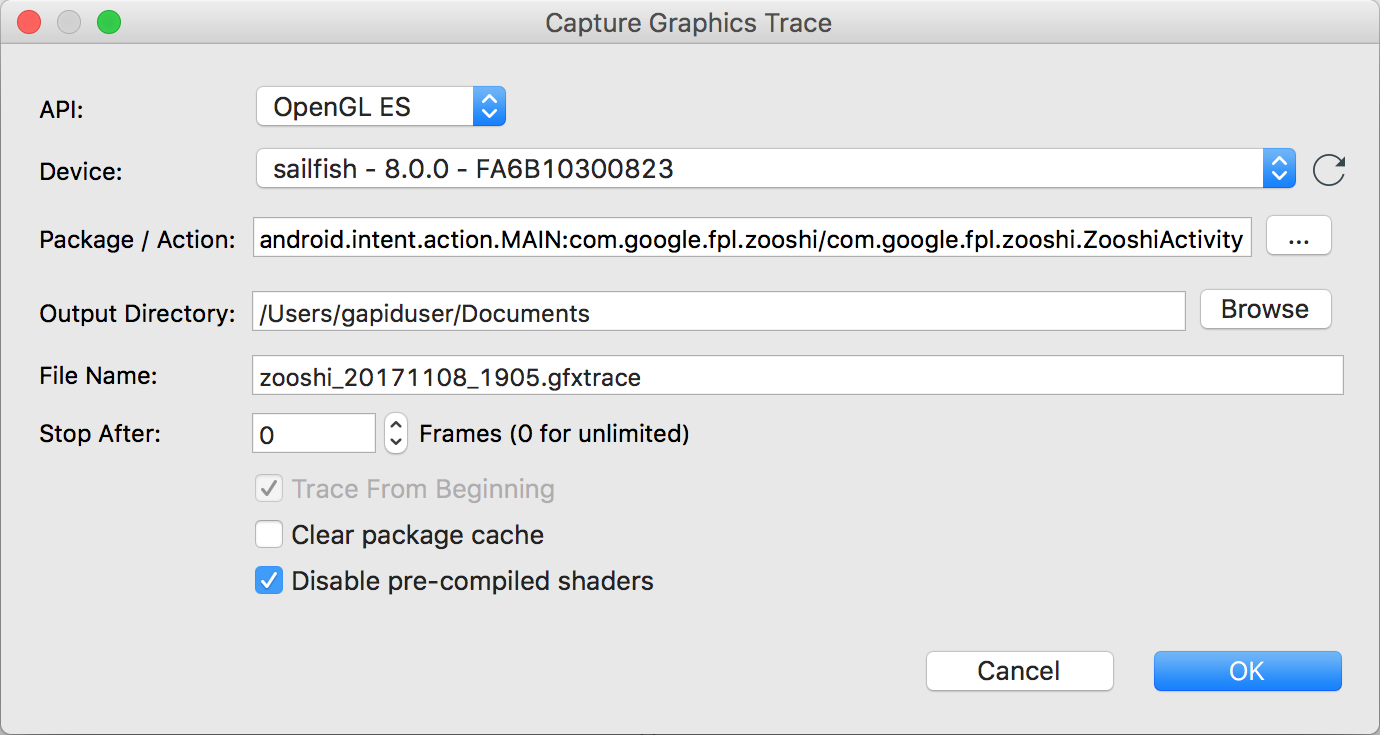
-
From the
APIdrop-down, select the graphics API you want to trace. -
From the
Devicedrop-down, select the Android device. -
Using the
...button, select the Android Activity you want to trace. -
Select an output directory.
-
Select an output file name.
-
If you wish to automatically stop tracing after N frames, then use a non-zero number for
Stop After. -
If you wish to start tracing as soon as the application is launched, enable the
Trace From Beginningoption. If option is set, then in the tracing dialog, you must pressStartto start the capture. Tracing OpenGL ES calls currently requires recording form the very start of the application. If the part of the application you want to debug is takes significant time to reach from application startup, consider creating a separate Activity that launches straight into the part of the application you care about. -
If you would like to erase the package cache before taking the trace, enable the
Clear package cacheoption. -
If tracing an OpenGL ES application you likely want to keep the
Disable pre-compiled shadersoption enabled. This option fakes no driver support for pre-compiled shaders, usually forcing the application to useglShaderSource(). GAPID is currently unable to replay captures that uses pre-compiled shaders.
Click OK to begin the trace.