
GAPID supports tracing Vulkan calls made by applications on Windows and Linux.
Dependencies and prerequisites
- A Vulkan application compiled with x86-64. 32-bit applications are not currently supported.
Taking a capture
Click the Capture Trace... text in the welcome screen, or click the File → Capture Trace toolbar item to open the trace dialog. The second tab will allow a Desktop trace.
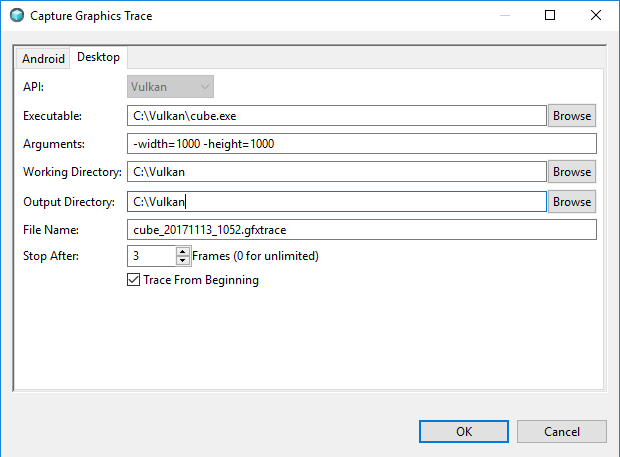
-
Currently, the only
APIthat is supported for Desktop is Vulkan -
Browse, for the Vulkan exectuable that you want to trace. -
Add any command-line arguments that are necessary for your program.
-
Select the
Working Directoryfor your program. -
Select an output directory.
-
Select an output file name.
-
If you wish to automatically stop tracing after N frames, then use a non-zero number for
Stop After. -
If you wish to start tracing as soon as the application is launched, enable the
Trace From Beginningoption. If option is set, then in the tracing dialog, you must pressStartto start the capture.
Click OK to begin the trace.